
Rogeha Scene
Film a place or an object for a minute, and walk around it in 3D. Rogeha Scene turns a video or a folder of photos into a 3D scene, trains it on a graphics card rented by the minute, and shows the result in a viewer of its own.
Version 0.2.0 (build 118), for Windows. In development, not in the Microsoft Store yet. A run on a rented graphics card costs about 20 to 45 cents.

From a video to a scene
The whole way, in one window. You choose the capture and the method; the app does the rest and keeps you informed of every step, its time and its cost.
1 · Capture
A video of a minute or two, walking around the subject at half speed, or a folder of photos. The app picks the sharpest frame in each moment and drops blurred ones and near-duplicates.
2 · Rent a GPU
From Vast.ai or RunPod, under your own account. Before anything is rented, the app shows what the whole run will cost and asks.
3 · Place the cameras
COLMAP works out where every frame was taken, on the GPU. If the track looks wrong, the run pauses and asks before it spends money on training.
4 · Train
About a quarter of an hour on an RTX 4090, with a live preview of the scene as it forms and charts of how training is going. A watchdog on the machine ends the rental at your hour cap, even if your PC is off.
5 · Look around
The result comes back to your PC, the machine is destroyed, and the scene opens in the viewer.
Why Gaussian splats
Most of the 3D you have seen, in games, product pictures or architecture, is made of meshes: a surface of triangles, painted with images called textures, and lit by the computer each time it draws, from materials and lights that someone set up. That suits things designed on a computer. For a real place it is hard: the surface has to be reconstructed first, and leaves, hair, fences, glass and reflections rarely survive the trip. The result tends to look like a model of the place.
Gaussian splatting, published in 2023, skips the surface. A scene is millions of small, soft, see-through blobs: each one an ellipsoid with a position, a size and shape, an opacity, and a colour that changes with the direction you look from. Training moves and reshapes them until, seen from every photo position, they reproduce the photos. Nothing is modelled and nothing is lit: the light is already in the scene, as it was when you filmed, shine and reflections included.
| A mesh | Gaussian splats | |
|---|---|---|
| Made of | Triangles, textures and materials | Millions of soft, coloured blobs |
| Light | Computed when drawn, from lights someone placed | Captured with the photos, part of each blob's colour |
| Fine detail | Leaves, hair and wire need a surface, and often fail | Filled in as the camera saw them |
| Shine, reflections | Need materials and surroundings set up | Move with the view, as photographed |
| Made by | Modelling, or reconstruction and clean-up | Training from photos: about a quarter of an hour on a rented GPU |
| Drawn | Fast, on any graphics | Sorted every frame: a recent graphics card or phone |
| Size | Small | Large: tens to hundreds of MB |
The Truck, three ways
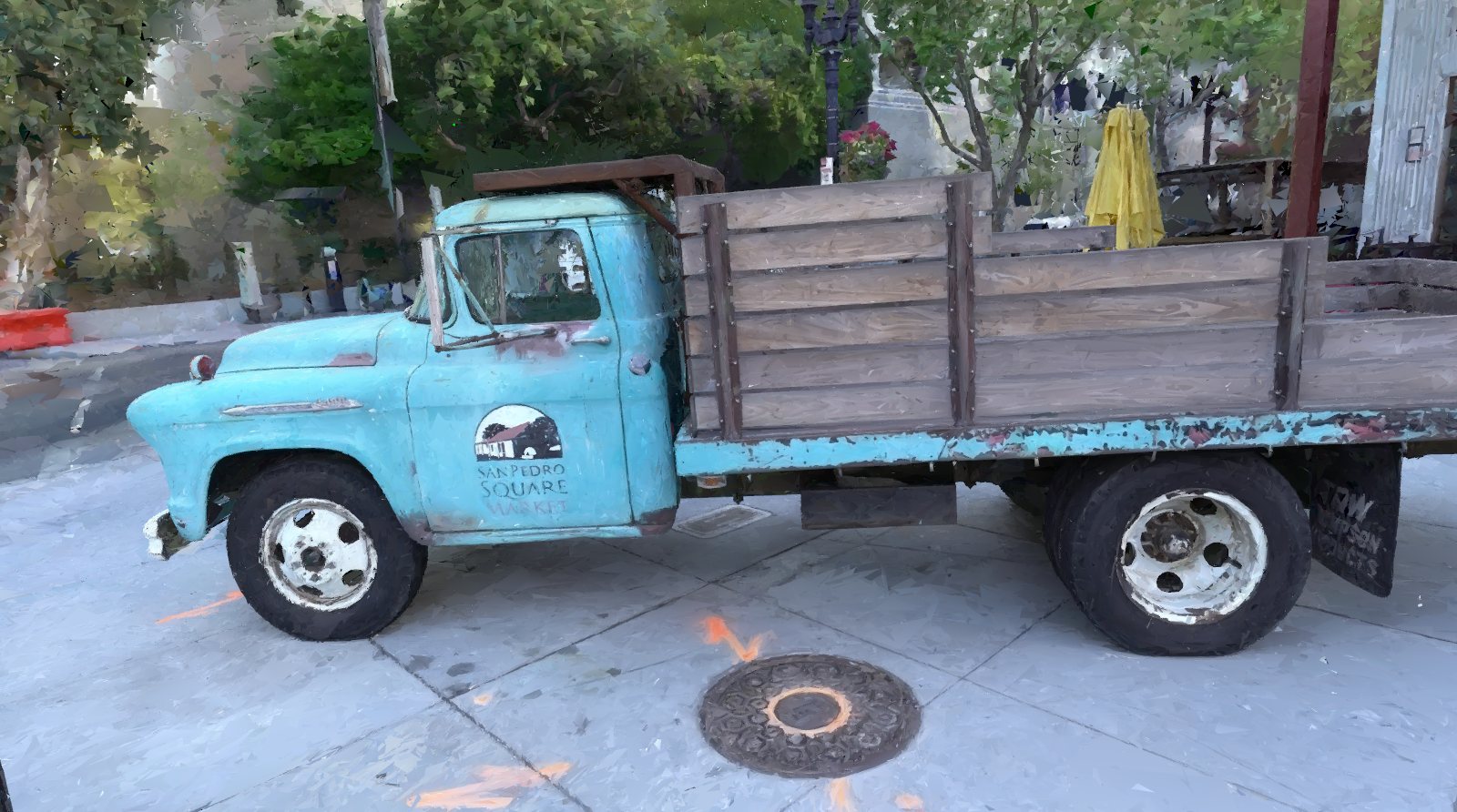
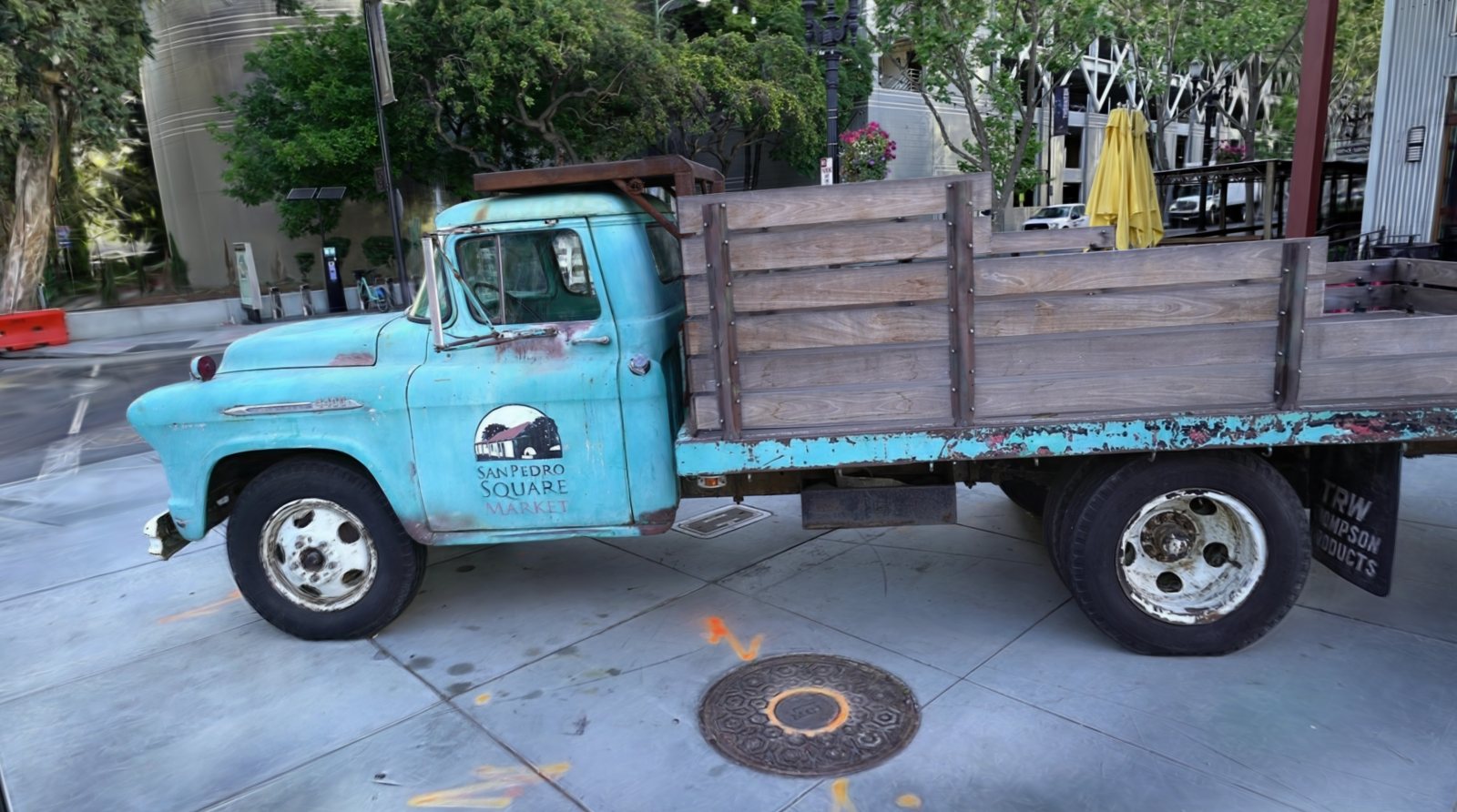
The same camera position three times: the Truck as a mesh, first as a 3D program shows its shape, then with the colours Triangle Splatting+ captured, and then as Gaussian splats.
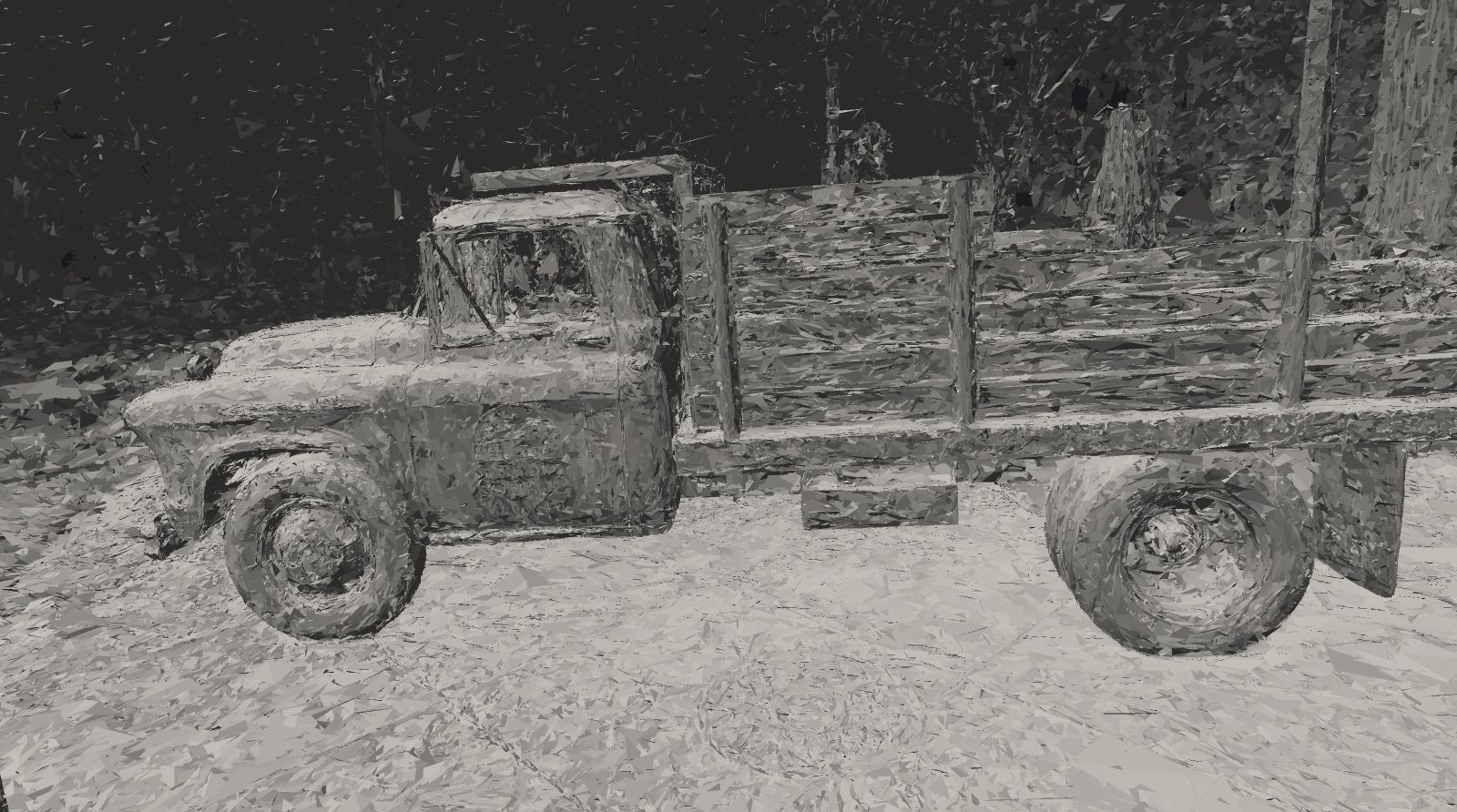
The mesh's shape: 792,000 triangles, lit here by one light, as a 3D program draws a model. The truck itself is well formed; the trees are loose triangles, and the sky has no surface at all.
The same mesh with the colours it learned from the photos: 22.4 dB PSNR on photos it never trained on, in 29 minutes for $0.23. A real mesh you can take into other tools.
Gaussian splats, 2 million: 26.4 dB on the same held-back photos, in 24 minutes for $0.20. The leaves, the shine on the paint and the far buildings are all there.
When a mesh is still the better choice
Splats show a place as it was, and they are hard to change. A splat scene cannot be relit for another time of day, measured precisely, given physics or 3D-printed, and most 3D software still expects meshes. That is why Rogeha Scene also offers Triangle Splatting+, which trains like splats but ends as a real mesh: less lifelike, but solid, and ready for other tools.
Three ways to build a scene
The method is a switch at the top of a new run; the Truck above was built with two of them. All three share the frames, the camera positions and the upload; each builds its own code on the rented GPU.
- Gaussian splatting
- The default. Millions of soft, coloured blobs, which give the most lifelike result. Options for a fixed budget of splats, anti-aliasing, exposure compensation for photos taken at different brightness, and a focus region that puts more detail on the subject. Uses gsplat.
- Triangle Splatting+
- Opaque triangles with shared corners: a real mesh, for tools that need one. Less lifelike than splats, more solid.
- Triangle Splatting
- The original method: soft, see-through triangles, with better published scores than its successor but no usable mesh.

See the price before you rent
GPUs are rented by the hour from strangers' machines around the world, so the app does the comparing for you.

The whole run, costed
Time on the machine, moving the video up and the result back, all at that machine's price. A slower card can be the cheaper run.
Measured from your PC
Before renting, the round trip to the 40 cheapest hosts is measured in parallel, in about two seconds: a cheap machine on the far side of the world can cost more in upload time.
Caps you set
A price cap and an hour cap. If the offer you picked is gone by the time you start, the app asks rather than renting something else; it never quietly moves your run to another continent.
A bad capture is caught before it costs you
Most failed 3D scans fail at the start: blurred frames, too little overlap, a track that falls apart. Rogeha Scene checks before the expensive part.

Track review
If the camera path has jumps, or under 80 % of the frames were placed, the run pauses and shows the path from above, jumps in red: train anyway, or stop for a few cents.
Thin captures
Too few points per photo, or photos that barely overlap, are measured before training. The run page says which it is and what to change next time.
Why frames were dropped
Each dropped frame gets a reason: blurred, too little texture, too dark, no overlap, or something moving. With the times in the video and thumbnails, so the next capture is better.
Live preview
Half a minute into training, the scene starts arriving on your PC, and the viewer reloads it as it improves, keeping your view.
A viewer made for splats
Built into the app on the PC's own graphics, a laptop's included: the Truck's 3 million splats draw at 1600 × 900 in about 21 to 27 milliseconds on an AMD Radeon 680M, built into the processor.
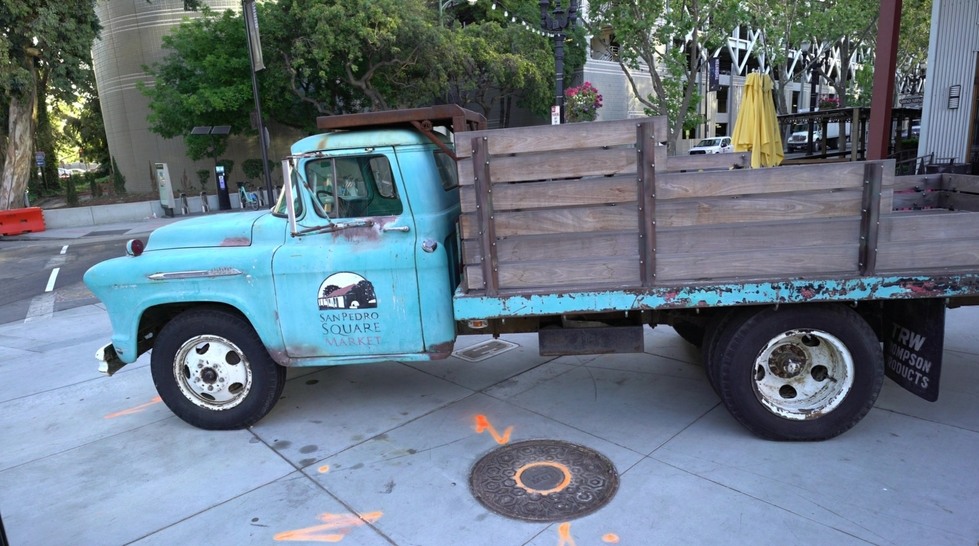
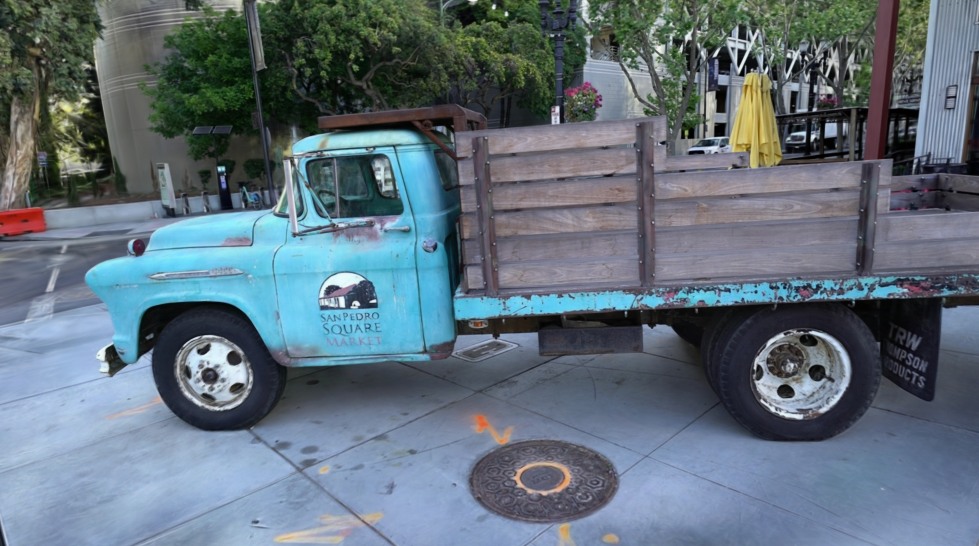
RenderPhoto
Drag the divider. Left of it, the scene rendered from where the photo was taken; right of it, the photo itself. This photo was held back from training, so the scene never saw it. The app's Compare with the photo does the same at every photo position.
Orbit or fly
Orbit around the point every photo looked at, or fly through with the keyboard. Double-click anything to orbit it; jump to any photo's viewpoint and back to the overview.
Clean up
The large, blurred splats that fill the screen when you fly into a scene fade out, so what is behind them shows. Seen from a photo position, the scene looks as trained.
Colour that changes with the view
Each splat keeps the colour it has from every direction, so shine and reflections move as you move. Exposure, temperature, tint, contrast and saturation can be graded afterwards.
Take it with you
- Picture
- The current view as a PNG at full resolution.
- Fly-through
- A one-minute video along the path the camera took, smoothed out, as an MP4.
- Web page
- A folder that shows the scene in any browser, phones included, opening on the view you chose and circling it; a lighter version loads first on phones.
- Files
- A .splat for most splat viewers and tools, and a .ply with your colour grading baked in.
Look around the Truck yourself
This is the web page export of the Truck, as the app wrote it: the scene runs in your browser, on your own graphics. Drag to orbit, scroll or pinch to come closer. It is a lighter export: 600,000 of the scene's 2 million splats, the ones that look biggest from where the photos were taken, so the truck keeps its detail.
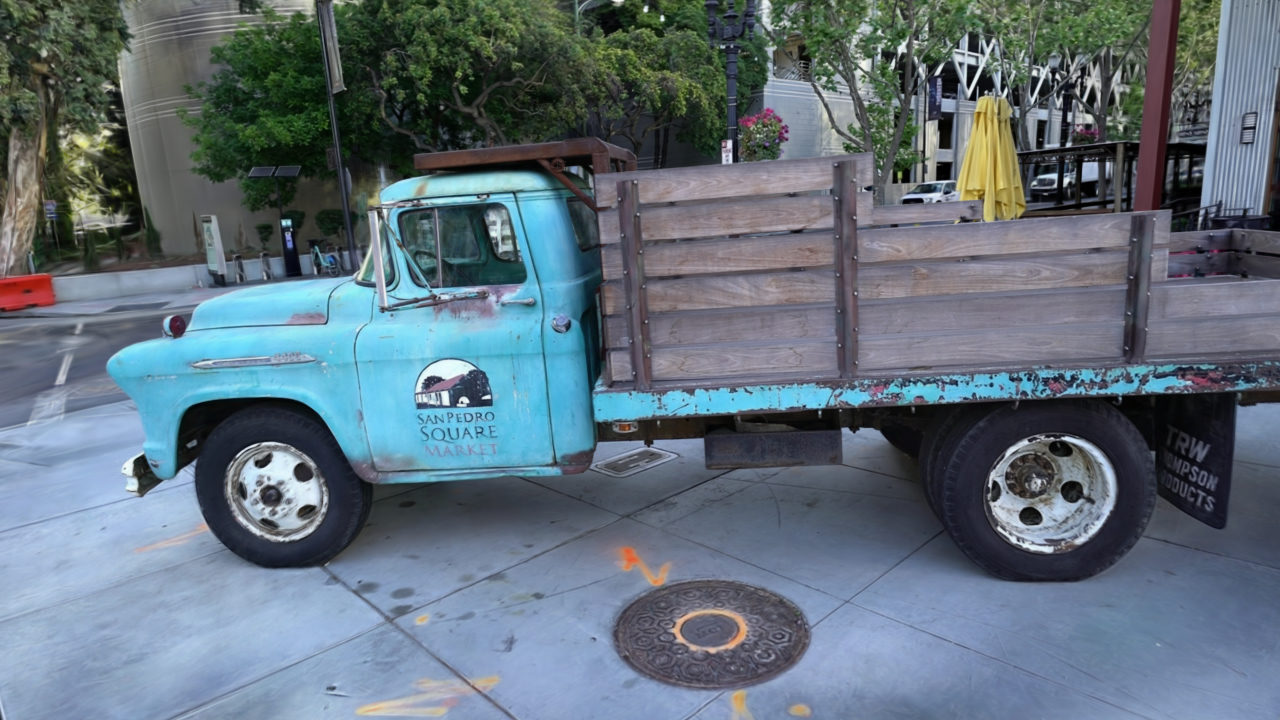
Runs on most computers and recent phones with WebGL 2. Open it on its own page →
Private by design
Your runs, results and settings stay on your PC. Only what a run needs leaves it: your photos or video go to the machine you rent, under your own account with Vast.ai or RunPod, and that machine is destroyed when the run ends. Rogeha Studio receives none of it.
Read the app's privacy policy →
Under the hood
- App
- Rust, with egui and wgpu, in the Rogeha Studio design system's colours, light and dark following Windows. One exe, with the scripts for the rented machine built in.
- Viewer
- Splats projected to screen as ellipses, sorted back to front on a background thread and blended as they were trained; soft triangles drawn with the authors' own window function.
- On the GPU
- COLMAP 4.2 for the camera positions, then gsplat or the Triangle Splatting authors' code for training, each built on the machine for its graphics card.
- Rental
- Vast.ai and RunPod through their APIs; the upload as one stream over SSH; a watchdog on the machine that deletes it at the hour cap.
- Tested
- On the Truck scene from the Tanks and Temples benchmark, scored on photos held back from training, as research papers score it.
Where it stands
Rogeha Scene is in development, at version 0.2.0. It runs end to end on rented GPUs, and on the Truck benchmark its Gaussian splatting scores 26.4 dB PSNR, above the 25.2 dB of the original 3D Gaussian Splatting paper, for about 20 cents of GPU time. Full runs have been made on Vast.ai; on RunPod, so far only renting, uploading and shutting down. Not yet tried: every GPU type except the RTX 3090, 4090 and 5090, and Vast.ai's cheaper interruptible machines.
Interested in trying it? Write to support@rogehastudio.com.
The Truck scene is from the Tanks and Temples benchmark (Knapitsch, Park, Zhou and Koltun, 2017), licensed under CC BY 4.0. The renders are Rogeha Scene's.